Now Reading: How To Plan Equipment Rentals For Remote And Hard-To-Reach Projects
-
01
How To Plan Equipment Rentals For Remote And Hard-To-Reach Projects

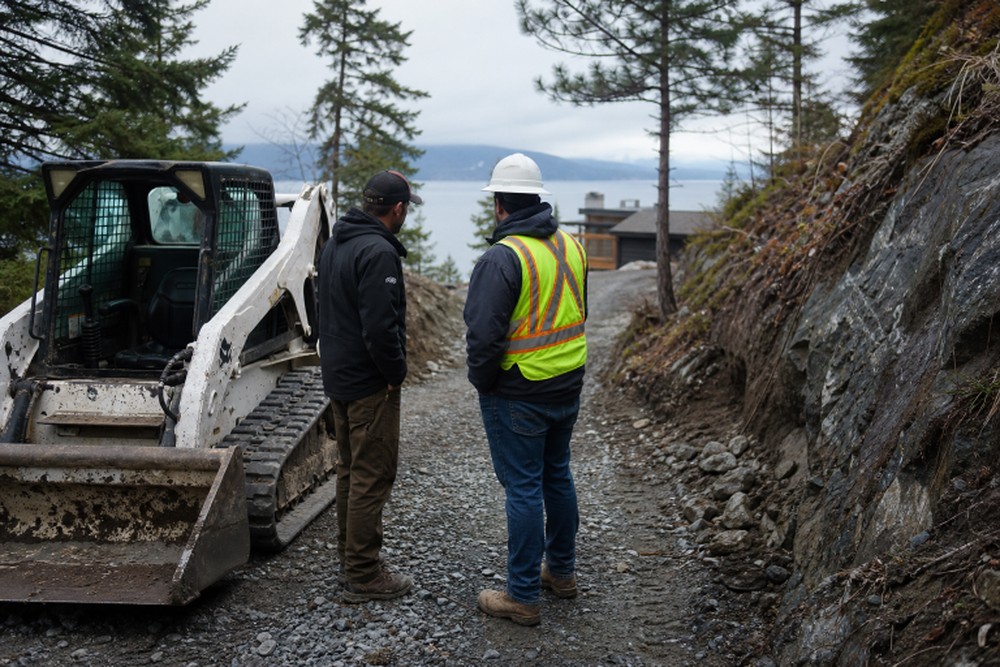
Key Takeaways
- Remote jobs require planning for access, transport, fuel, weather, service, and machine fit.
- A site review before booking can prevent failed deliveries, unsafe unloading, and avoidable delays.
- The right attachment, ground conditions, and operator requirements are as important as the base machine.
- Written rental terms help control costs for delivery, pickup, damage, fuel, and extensions.
Renting equipment for a remote project is about more than choosing a machine with the right size or daily rate. A jobsite may be miles from the nearest rental yard, accessible only by narrow roads, uneven terrain, or a restricted entrance. Before booking, learn more about available equipment options and share accurate job site details with the rental provider.
Careful preparation keeps the project moving when conditions are difficult. Whether the work involves excavation, material handling, grading, lifting, or site cleanup, the rental plan should account for the complete path from the rental yard to the final work area.
Why Remote Projects Need More Planning
Hard-to-reach sites pose logistics challenges that do not arise on a typical urban jobsite. Limited turning room, low branches, bridge restrictions, soft shoulders, poor cell coverage, and long service distances can all affect the rental. With rental demand expected to remain strong in 2026, reserving early can also improve the chances of securing the needed machine and attachments for the right dates.
Think beyond the equipment itself. Confirm the distance from the rental location, the condition of access roads, overhead hazards, fuel availability, parking space, and the plan for a repair or recovery event. A lower daily rate does not help if the machine cannot be delivered safely or cannot reach the work zone.
Start With A Site Review
A quick site review is one of the best ways to avoid surprises. Send the rental coordinator clear photos, a short walk-through video, or a simple sketch that shows the entrance, travel route, unloading point, and work area. Include measurements rather than relying on estimates.
Site Review Steps
- Mark the main entrance and final work area.
- Measure gates, road widths, bridges, tight turns, and overhead clearances.
- Note slopes, drainage issues, standing water, loose gravel, and soft ground.
- Identify a level area for unloading, parking, and daily inspections.
- Confirm that the equipment can travel from the unloading point to the work zone.
- Choose locations for fuel, materials, tools, and worker parking.
For example, a compact loader may fit through a gate but still be unable to make a steep turn beyond it without damaging a soft shoulder. Finding that out before delivery gives the team time to use another entrance, reinforce the route, or choose a different machine.
Match Equipment To The Task
Choose equipment according to the work requirements, not just the machine category. Two excavators, lifts, or loaders may appear similar while offering very different reach, lifting capacity, ground pressure, turning radius, and attachment compatibility.
Key Matching Questions
- What must be lifted, moved, dug, cut, graded, or compacted?
- What load weight, reach, depth, or dump height is required?
- Will tracks or tires work better for the site surface?
- How much room is available for turning and positioning?
- Which attachments are essential, such as forks, buckets, augers, breakers, or trenchers?
- Will the work occur near trees, buildings, traffic, trenches, or power lines?
Do not treat attachments as an afterthought. A machine without the correct bucket, forks, hydraulic tool, or coupler can leave a crew waiting while a second delivery is arranged. Confirm availability, compatibility, pricing, and installation requirements before signing the agreement.
Plan Delivery And Access
Delivery should be part of the equipment decision from the beginning. Ask what truck or trailer will be used, how unloading will happen, and whether the route has height, weight, or width limits. Provide a reliable site contact who can meet the driver and make access decisions if conditions have changed.
Confirm the delivery date, arrival window, unloading surface, permits, gate codes, and return pickup process in writing. Remote transport charges may include mileage, waiting time, special handling, route changes, or an additional trip. A clear plan protects both the schedule and the budget.
Build A Realistic Rental Budget
The daily or weekly rate is only one part of the total. Build the estimate around the full working period, including travel time, weather allowances, setup, and cleanup.
Total Rental Cost = Base Rate + Delivery + Pickup + Fuel Or Charging + Attachments + Damage Protection + Operator Costs + Overtime Or Extensions
Ask whether the price is based on a day, week, or month, how many operating hours are included, and what happens if the weather stops work. Also, clarify responsibility for refueling, cleaning, damage, tires or tracks, and late returns. Compare that complete figure with the cost of buying, hauling, storing, maintaining, and insuring owned equipment.
Check Safety And Operator Needs
Safety planning starts before the machine arrives. The operator must understand the equipment, the site hazards, and the task. OSHA’s construction safety guidance can help project teams identify hazards, inspect equipment, and build a stronger jobsite process.
Before delivery, confirm who will operate the machine, whether that person has the required training, and whether a qualified operator should be included with the rental. Mark overhead lines, traffic routes, trench edges, slopes, blind spots, and swing areas. For lifting work, verify load limits, ground stability, rigging needs, and clearances before operations begin.
Prepare For Weather And Breakdowns
Remote conditions can change quickly. Rain can turn an access road into mud, snow can close a route, and heat can increase fuel use and worker fatigue. Build extra time into the rental period and establish a backup work plan before the weather changes.
Ask how after-hours service calls are handled, how long a technician may take to reach the site, and who pays for recovery if equipment becomes stuck. Keep approved fluids, fuel, communication devices, and basic site tools available. Take time-stamped photos and record machine condition at delivery, during use, and before pickup.
Create A Rental Checklist
Use one shared checklist so the site manager, operator, rental coordinator, and transport provider are working from the same information:
- Project address, GPS details, and site contact information
- Equipment model requirements, attachments, and accessories
- Rental dates, delivery instructions, and pickup plan
- Access measurements, route concerns, and unloading location
- Fuel or charging plan and operator responsibilities
- Safety hazards, emergency contacts, and inspection records
Common Questions
How Early Should Equipment Be Reserved?
Reserve as soon as the machine type, dates, and likely delivery route are clear. Early booking gives more time to compare options, secure attachments, and solve access concerns.
What happens if the equipment cannot Reach The Site?
Do not force access. Pause the delivery and review alternate entrances, a smaller machine, a different trailer, route improvements, or a revised work plan.
How Can Damage Disputes Be Reduced?
Document the machine at delivery and return. Record existing marks, operating hours, fluid levels, and any issues reported during the rental period.
Conclusion
Remote equipment rentals succeed when logistics are treated as part of equipment selection. A detailed site review, an accurate machine match, a delivery plan, a realistic budget, and a clear safety process can prevent costly downtime. Plan before the equipment leaves the yard, and the project will be better prepared for difficult access, changing weather, and tight schedules.