Now Reading: The Importance of Progress Indicators in User Interfaces: Enhancing User Satisfaction and Engagement
-
01
The Importance of Progress Indicators in User Interfaces: Enhancing User Satisfaction and Engagement
The Importance of Progress Indicators in User Interfaces: Enhancing User Satisfaction and Engagement

Key Takeaways
- Progress indicators are essential for enhancing user satisfaction by providing visual feedback during wait times.
- Different types of progress indicators, such as linear bars and circular spinners, serve various functions in user interfaces.
- Proper implementation of progress indicators can reduce perceived wait times and improve overall user engagement.
The Role of Progress Indicators in User Experience
In the digital age, users expect applications and websites to respond instantly to their actions. When inevitable delays occur, a well-designed progress indicator plays a pivotal role in retaining user attention and preventing frustration. A thoughtfully implemented UI progress indicator offers immediate visual feedback, letting users know that the system is actively processing their request rather than being stalled or frozen.
These visual cues are more than just decorative elements. They assure users that their interactions matter and that progress is being made, even if the process behind the scenes requires a few moments. Without a visible indicator, users might become confused, impatient, or assume the application has encountered an error, leading to task abandonment and reduced trust in the platform. Designing effective progress indicators means understanding the psychology behind user expectations. A quick, seamless user journey can dramatically increase satisfaction and loyalty. Conversely, leaving users in the dark during wait times can erode confidence in a product’s reliability and professionalism. Providing timely and relevant feedback through progress indicators builds a sense of control for users, making them more patient and engaged during necessary delays. The type and style of indicator should match the task’s nature and expected duration, giving users the right level of insight into what is happening.
Types of Progress Indicators
Modern user interfaces incorporate a variety of progress indicators tailored for different scenarios and workflows. Choosing the appropriate form of feedback can significantly enhance clarity and reduce user frustration.
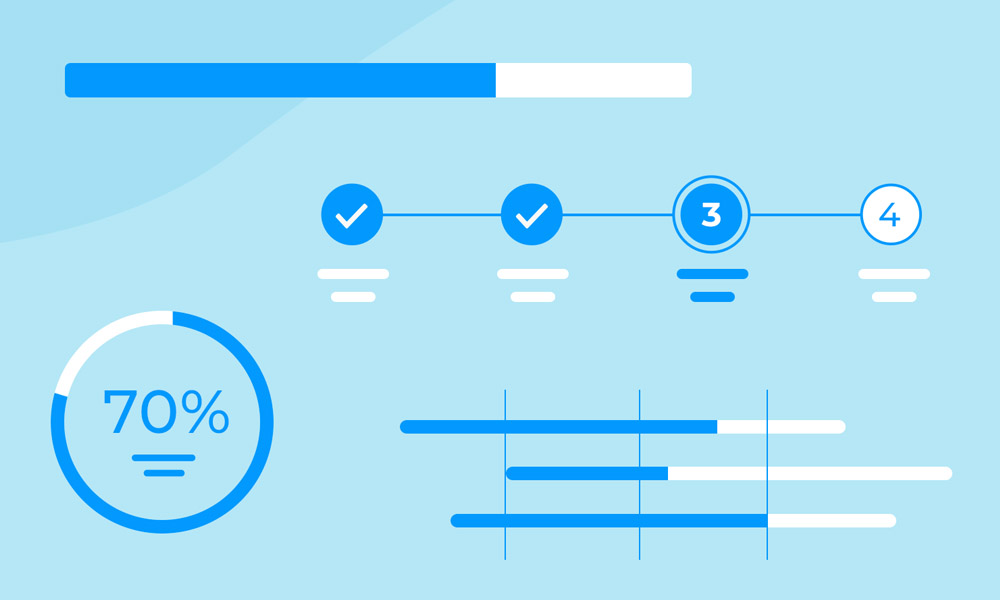
- Linear Progress Bars:These horizontal bars gradually fill as a task proceeds, making them suitable when the system can estimate completion time. Users appreciate this measurement, as it lets them gauge how long a process might take.
- Circular Spinners:For events with unknown durations, circular spinners signal that an action is ongoing without specifying how long it will last. This is common during unpredictable or variable processes, such as establishing a network connection.
- Percentage Indicators:Numeric feedback in percentages allows users to precisely track task advancement, offering the clearest sense of process progression. This format works well for data uploads, downloads, or installations.
- Skeleton Screens:Rather than displaying static loading icons, skeleton screens provide users with a preview of the layout or content structure. This technique makes wait times feel shorter by indicating what will appear on screen, bridging the gap while content loads.
Psychological Impact on Users
The psychological influence of progress indicators is well-documented in research on human-computer interaction. Users tend to overestimate the duration of silent, ambiguous waits, which leads to impatience and dissatisfaction. When progress is communicated clearly, users feel reassured and tend to underestimate the duration. Animated progress bars or skeleton screens help draw attention away from the wait itself, making the experience more pleasant. According to a study published by the Nielsen Norman Group, even slight movement or incremental feedback can help transform user perception, making a slow process feel significantly faster and more manageable. Notably, the illusion of progress or clear communication about ongoing tasks helps minimize anxiety. Regularly updated indicators, rather than static screens or silent pauses, cultivate a sense of momentum and transparency. Ensuring that these visual cues are continuous and informative is critical.
Best Practices for Implementing Progress Indicators
Thoughtful use of progress indicators is integral to delivering a seamless, consistent user experience. Following industry best practices ensures indicators are both helpful and unobtrusive.
- Provide Accurate Feedback:Maintain honest communication. Indicators should accurately reflect the true status of a process to prevent damage to user trust. Avoid misleading users with indicators that stall or reset unexpectedly.
- Use Animations Sparingly:While movement attracts attention, excessive or flashy animations can distract users and diminish clarity. Simple, purposeful movement ensures users remain focused on the task.
- Maintain Consistency:Progress indicators should look and behave the same across your product. This familiarity helps users quickly interpret each indicator.
- Optimize Performance:Keep progress indicator assets lightweight to prevent them from contributing to slowdowns or negatively impacting overall system performance. Fast-rendering indicators enhance the sense of an efficient experience.
Real-World Examples
Real-world applications demonstrate how effective progress indicators can transform user interactions. In the fintech space, onboarding new users involves several steps, including completing forms and verifying identity. Instead of overwhelming users, leading apps break this journey into manageable sequences using step progress bars. Another example is seen in popular e-commerce platforms. When users place an order or track a delivery, dynamic progress bars guide them through the checkout and shipping processes. This transparency reduces anxiety about delays and boosts user satisfaction. Companies such as Google and Apple have set industry benchmarks for using clear, minimalistic progress indicators. Their feedback cues not only fulfill practical needs but also reinforce brand reliability.
Conclusion
Progress indicators are indispensable tools in user interface design. By providing clear, honest, and timely visual feedback, they increase user confidence, reduce perceived wait times, and foster a more engaging digital experience. Whether displayed as progress bars, spinners, step indicators, or loading animations, these elements help users understand system status and maintain a sense of control throughout their journey. Well-designed progress indicators can minimize frustration during delays, improve task completion rates, and create a smoother overall experience. As user expectations for speed and transparency continue to grow, implementing effective progress indicators is no longer optional but essential. Ultimately, they hold the key to turning necessary delays into opportunities to build trust, strengthen usability, and enhance satisfaction across any modern digital product.